As CPU’s have gotten more sophisticated with their logical cores, you may have noticed that if you have a quad-core CPU with eight logical cores after Hyper-Threading, the Performance tab of the Windows 7 Task Manager has problems displaying real-time graphs of per-core utilization..
Wednesday, 16 November 2011
Nokia might be releasing a Windows 8-based tablet by June 2012 as well as follow up the recently released Windows Phone 7 devices – Nokia Lumia 800 and 710 – with an even better Lumia, says head of Nokia France Paul Amsellem.Friday, 11 November 2011
Microsoft has officially unveiled the Windows 8
Microsoft has officially unveiled their latest operating system to the public by releasing a Windows 8 preview video, which shows off some of the newest operating system features.
Windows 8 will run on all tablet PCs, notebooks, netbooks and of course more conventional desktop machines. But with Windows 8, Microsoft developers are aiming to create a seamless experience across all devices.
Mike Angiulo, corporate vice president of Windows Planning says:
“Our aim with ‘Windows 8′ is to make the user experience a natural extension of the device, from the time you turn on your PC through how you interact with the applications you know and love. This represents a fundamental shift in Windows design that we haven’t attempted since the days of Windows 95, presenting huge opportunities for our hardware partners to innovate with new PC designs.”
So basically there will be a single user interface for each version of Windows 8 that will look, function, and offer all the same features no matter what device is running it.
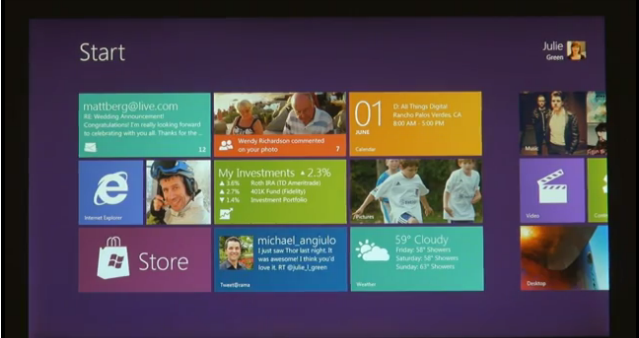
The Windows 8 preview was debuted at the D9 conference in California and was also further elaborated at Computex, 2011 in Taipei, Taiwan.
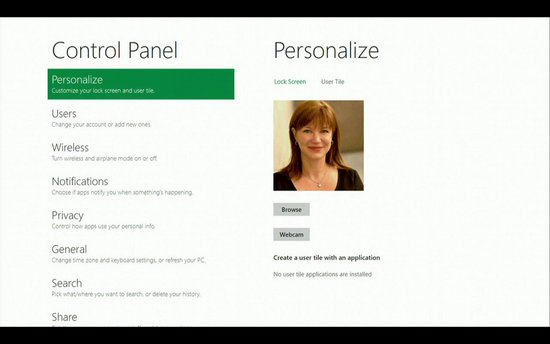
Microsoft unveiled the new operating system through several live demos and a fully narrated Windows 8 preview video. They showed off the main focus of the new operating system, a fully functional touch based interface.
The new interface finally provides an explanation for why Microsoft never offered Windows 7 in the form of a tablet experience. Windows 7 offered a great PC experience, but it was never optimized for touch-screen devices.
Windows 8 Preview of features and innovations
Windows 8 will now feature full support for tablet devices with a fully updated user interface and tile based menu system. Of course it will also support more traditional PC platforms including but not limited to desktops, notebooks, and netbook machines.
The Microsoft development team also unveiled additional information about Windows 8 to the public, but they did not provide an exhaustive example of the new operating system. While we don’t exactly know every detail about Windows 8, here’s the breakdown of what we do know:
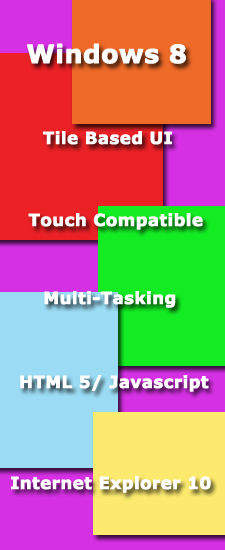
-Windows 8 will run on tablets, notebooks, netbooks, desktops, and probably mobile devices.
-Windows 8 will provide a streamlined touch interface for tablets and a traditional control scheme for a mouse and keyboard.
-The new user interface will be completely touch optimized for use with touchscreen devices that support gesture and multi-touch features.
-Windows 8 will ship with Internet Explorer 10 as the default browser.
-Windows 8 will use tiled menus similar to the Windows Phone 7 interface, but they will be more advanced and accessible.
-Windows 8 will run older software that is compatible with all previous versions of Windows (you can breathe a sigh of relief).
-Windows 8 will offer multi-tasking opportunities just as previous versions have in the past.
-Windows 8 will scale to the operating device’s proper screen resolution; which means it will scale automatically to tablets, netbooks and higher end desktops.
-Applications will be launched from a tile based start menu instead of the traditional icon list based menu.
-Web based applications and programs will use HTML5 and Javascript for better overall performance.
It is also very important to note that “Windows 8” is currently just a codename for the new operating system, which means the name can be changed at any time. Remember that Windows Vista was previously codenamed the “Mojave Experiment“, while Windows 7 on the other hand remained “Windows 7” during the entire development period. The operating system’s development name doesn’t necessarily reflect the official product release name.
Windows 8 Preview Video
Don’t just take our word for it, check out all the awesome new innovations and features of Windows 8, in the “Building Windows 8 Preview“.
Windows 8 release date
We can expect Windows 8 to be launched sometime in mid-late 2012, however, it’s too early to predict the Windows 8 release date, since it is still under development. Nevertheless, the only question that haunts each and every one of us – Will Windows 8 win the battle against Apple which it had lost several years back?
IS Windows 8 in August 2012, Windows 9 in November 2014?
A leaked roadmap suggests that Microsoft’s upcoming operating system Windows 8 will be released to retail channels in August 2012. The roadmap, if legit, confirms a Windows 8 Beta release during next year’s CES 2012 in January (see Coming the Windows8 Beta Release In January). Microsoft will release the beta of the Windows Store and the online market customer preview at the same convention.
The release candidate and the beta of the online market will be revealed in April 2012 during the Mix 2012 conference. Windows 8 RTM (release to manufacturing) during the gaming expo E3 2012, and the final version of Windows 8, the online market, Windows Phone 8 and the Xbox Store during August 2012.
If the roadmap is legit, we will see a release of Windows 8 in about ten months from now.
The roadmap interestingly enough does not stop there. It covers the years 2013 and 2014 as well. It may come as a surprise to many that Microsoft may have the intention to ship Windows 8, the successor of Windows 8, two years after the Windows 8 release.
The roadmap suggests a November 2014 release for Windows 9. In 2013 we will see the release of Internet Explorer 11 during Mix 2013 and the Xbox loop and Windows 9 Developer Preview releases during Build 2013.
The CES in 2014 will see the release of the Windows 9 Beta, Mix 2014 the Windows 9 Release Candidate, the Build 2014 conference the Windows 9 RTM and Windows 9 Mobile RTM, and November 2014 finally the release of Windows 9, Windows 9 Mobile and the Kinect HP2.
The information are not confirmed and it is likely that we won’t see an official confirmation or response. What’s your take on the roadmap? Will Microsoft release Windows 9 only two years after Windows 8?
The Windows 8 Task Manager
The new Windows 8 Task Manager this will provide new features if you have more than 1 CPU.
Problem With the Windows 7 Task Manager
As CPU’s have gotten more sophisticated with their logical cores, you may have noticed that if you have a quad-core CPU with eight logical cores after Hyper-Threading, the Performance tab of the Windows 7 Task Manager has problems displaying real-time graphs of per-core utilization. To make the CPU performance display, it squeezes in eight, time-on-the-x-axis charts into a small horizontal window: it doesn’t work very well. Now step forward to today’s more sophisticated CPU’s. How well will their information be displayed two CPUs and 16 logical cores, or four CPUs and 32 cores as Microsoft details in its latest Building Windows 8 blog post, 160 logical cores? Something has to change.
The Metro-Style Screen
Windows 8 will revolve almost entirely around the new Metro-style Start screen; but that does not apply to the new Task Manager. The Metro interface isn’t designed for apps with mega-data density, but that is what the Task Manager works with. Since Windows 95, the Task Manager has grown into a general system for debugging. Both consumers and power users alike use it this way. The problem is that as the OS has become more intense the data density of the Task Manager has also increased.
Differences
The main feature is that each core will now be represented as a block with its current utilization displayed as a percentage. There is no graph, no horizontal space constraints, just a heatmap-like grid (image above). You can compare cores for debugging purposes. So this increases the at-a-glance functionality of the Performance tab. You can now hover over a core to see its logical ID, too. And this interface will scale up to 640 logical cores, the Windows 8′s maximum. The Task Manager also modified The “Set affinity” dialog to make it easier to assign processes to specific processor.